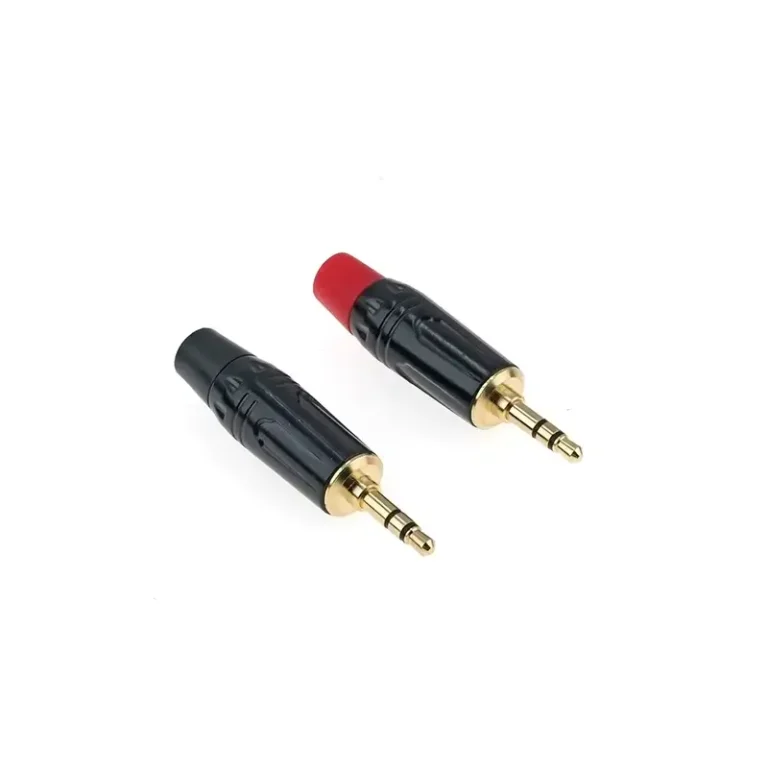
Whether it’s fixing old headphones, setting up a home studio, or connecting your phone to a car stereo, it’s crucial to understand the hardware. The 3.5 mm audio connector — the mini-jack on your headphones, phone, and camera — most often appears as a 3-pole 3.5mm TRS jack, but its 4-pole TRRS sibling adds a microphone.
This guide covers what the 3.5mm TRS connector is, how to wire the jack and plug, the TRRS (4-pole) variant and its CTIA/OMTP standards, and how to fix it when audio fails.
What Makes the 3.5 mm TRS Specific
The 3.5 mm (often called the “mini” or 1/8″) is the pocket-sized member of the TRS family — same Tip/Ring/Sleeve principle, scaled down for phones, laptops and portable gear. For the underlying conductor anatomy shared by every TRS size, see TRS anatomy. What sets 3.5 mm apart is its form factor and where it shows up — the focus of this guide.
Soldering a 3.5 mm Plug: What’s Different
The 6-step soldering method is identical across sizes — follow our full walkthrough in how to solder a TRS connector. The one thing unique to 3.5 mm: the solder tabs are tiny and close together, so use a fine tip and heat-shrink each conductor before assembly to avoid bridging Tip to Ring. The pinout you are soldering to is in the TRS pinout reference.
3.5 mm and the TRRS Question
Most confusion at 3.5 mm is really a TRRS question: a 3-conductor TRS plug carries stereo audio, while a 4-conductor TRRS plug adds a mic channel — and the two are only partly cross-compatible. We cover exactly what plugs into what, and which adapters work, in TRS vs TRRS: 7 critical differences.
Common Applications: Where 3.5 mm TRS Connectors Are Used
The versatility of the 3.5mm TRS connector enables it to serve a variety of roles in different industries.
1. Consumer Audio (Headphones, AUX, Portable Devices)
The most common use case. Wired headphones, automotive AUX inputs, portable speakers, MP3 players, and laptop audio outputs all use the 3.5 mm TRS standard. Signal levels are typically consumer line-level (−10 dBV) or headphone amplifier-level (a few hundred millivolts).
2. DSLR and Mirrorless Cameras (Video Production)
Video creators rely heavily on the 3.5 mm TRS connector for external microphone audio. Most on-camera shotgun microphones (RØDE VideoMic series, Sennheiser MKE 400, Sony ECM-W3) use 3.5 mm TRS to send audio into DSLR and mirrorless cameras.
⚠️ Critical compatibility note: Plugging a smartphone-format lavalier microphone (usually TRRS) directly into a camera’s TRS-only mic input results in no audio recording without an adapter (e.g., RØDE SC4 TRRS-to-TRS converter). This is one of the most common sources of “broken microphone” panic among new content creators.
3. Modular Synthesizers (Eurorack and Beyond)
In the Eurorack modular synthesizer ecosystem, 3.5 mm TS (mono) is the standard for control voltage (CV), gate, and audio patching. However, many modules — especially stereo audio interfaces and MIDI-over-3.5 mm modules — use the 3-pole TRS variant. Always verify the module’s specification before patching.
4. Aviation and Pro Audio Headsets
Worth noting: aviation headsets and certain professional intercom systems use non-standard 3.5 mm pinouts that look identical to consumer plugs but carry mono signal and dedicated microphone lines. Never assume a 3.5 mm jack is consumer-standard without checking the device manual.
These are the headline uses; for the wider TRS picture across cables, sizes, and balanced studio work, start at our TRS connector guide.
3.5 mm TRS Troubleshooting: 3 Most Common Problems
These are the faults specific to the 3.5 mm form factor (loose fit, worn jacks, lint-packed sockets). For general TRS signal problems, see quick troubleshooting.
Does your audio have a burst, intermittent, or only one side of the sound? Check the connection before throwing away the device.
Problem 1 — Pocket Lint and Debris Inside the Jack
Symptom: Plug doesn’t seat fully, intermittent audio, or only one channel working after inserting a plug that previously worked fine.
Cause: Smartphone and laptop 3.5 mm jacks accumulate pocket lint, dust, and debris over time — eventually preventing the plug from making full contact with all three internal contacts.
Fix:
- Use a non-conductive tool (wooden toothpick, plastic SIM tray ejector) or compressed air to clear the jack.
- Never use a metal object — this can short-circuit the contacts and damage the device’s audio chip.
- Inspect the extracted debris; a single piece of lint can cause weeks of intermittent audio problems.
Problem 2 — Plug Not Fully Seated
Symptom: Audio cuts in and out when you wiggle the plug; you have to push the plug in a specific direction for sound to play.
Cause: The plug isn’t fully inserted, usually because of:
- A thick phone case or laptop dust cover preventing the plug body from reaching the jack
- Lint buildup (see Problem 1)
- A bent or damaged TRS plug
Fix:
- Listen for the tactile “click” confirming full insertion.
- Remove your phone case or use a 3.5 mm extension cable to bypass case interference.
- For high-quality plugs, the metal collar at the cable end should be flush against the jack opening when fully inserted.
Problem 3 — “Underwater” or “Hollow” Sound
Symptom: Audio sounds distant, hollow, like the singer is underwater, or vocals/center-mixed instruments disappear while reverb remains audible. Engineers call this the “karaoke effect”.
Cause: Phase cancellation caused by ground/sleeve misconnection. Two common triggers:
- TRRS plug into TRS jack — the longer TRS sleeve shorts the TRRS microphone ring to ground, scrambling the channel mix.
- CTIA-OMTP mismatch — plugging a CTIA headset into an OMTP device (or vice versa) swaps mic and ground positions, causing the same effect.
Fix:
- Verify both endpoints are the same type (TRS-to-TRS or TRRS-to-TRRS).
- Check for CTIA vs OMTP compatibility (see TRS vs TRRS guide for full details).
- For DIY-soldered plugs, re-check the Tip and Ring weren’t reversed at one end.
Frequently Asked Questions
Can I plug a 3.5 mm TRS into a laptop’s combo jack?
Yes — modern laptops (post-2015) use combo jacks that auto-detect whether you’ve inserted a TRS (3-pole, stereo headphones only) or TRRS (4-pole, headset with mic) plug. Inserting a 3.5 mm TRS plug into a combo jack delivers normal stereo audio output, but no microphone input will be detected. This is the most common “my mic doesn’t work” scenario on combo-jack laptops.
Is a 3.5 mm jack the same as a 1/8-inch jack?
In practice, yes — they refer to the same connector. Technically, 1/8 inch equals exactly 3.175 mm, while the audio standard is actually 3.5 mm — a 10% difference. However, the audio industry has used “1/8 inch” and “3.5 mm” interchangeably for decades, and all consumer audio products built to either spec will interconnect normally. The 3.5 mm dimension is the true engineering standard; “1/8 inch” is the convenient imperial approximation.
Does gold plating on 3.5 mm TRS plugs improve sound quality?
Not directly — but it improves long-term reliability. Gold has superior corrosion resistance to nickel, so gold-plated contacts maintain low contact resistance over years of use, especially in humid environments (coastal, basement, gym bag, etc.). For new plugs, the sound difference between gold and nickel is audibly indistinguishable in consumer-level applications. Choose gold plating for connectors you plan to keep 5+ years; standard nickel is fine for everyday use.
What’s the difference between a 3.5 mm TRS plug and a 3.5 mm TRRS plug?
Count the black insulating bands on the metal shaft:
2 bands = TRS (3-pole) — stereo audio only, no microphone
3 bands = TRRS (4-pole) — stereo audio + microphone (or video)
Both share the identical 3.5 mm diameter but have incompatible internal wiring. For deep comparison, see our TRS vs TRRS connector guide.
Why does my 3.5 mm plug only work in one orientation?
Almost always internal cable damage near the strain relief. The Left or Right channel conductor has fractured inside the cable jacket, and rotating the plug temporarily restores contact through the wire’s broken ends touching. This is permanent — replace the cable or re-solder a new plug. Quality cables with proper strain relief typically prevent this for 12–24 months of daily use.
Can I convert a 3.5 mm TRS to RCA?
Yes — the most common adapter is a 3.5 mm TRS → 2× RCA stereo breakout cable, which splits the Left (Tip) and Right (Ring) channels into separate red/white RCA connectors. Used for connecting smartphones, laptops, and portable players to home stereo amplifiers. See our TRS to RCA connector guide for full setup procedures.
What gauge wire fits inside a 3.5 mm TRS plug?
Most 3.5 mm TRS plugs accept 26–28 AWG conductors with overall cable OD of 2.5–4 mm. Larger cables (used on pro 6.35 mm plugs) will not fit into 3.5 mm housings. Always check the specific connector’s datasheet — Redco 3.5 mm TRS connectors accept up to 3.8 mm OD, while compact Switchcraft 35HDBAU tops out at 4 mm.
Conclusion
The 3.5 mm TRS connector is a 145-year-old technology that still powers modern headphones, cameras, and audio interfaces — surviving Bluetooth, USB-C, and every other “killer” of the analog jack. Master three things and you’re set: identify TRS vs TRRS by counting black bands (2 vs 3), solder using the universal Tip = Left / Ring = Right / Sleeve = Ground pinout, and verify CTIA vs OMTP compatibility before plugging consumer headsets into legacy gear.
Browse Verchil’s complete TRS connector range or audio connector category for panel-mount sockets and cable-side plugs, or contact our technical team for custom 3.5 mm cable assemblies and bulk orders.
Working at a bigger size, or comparing formats? See the main TRS guide.