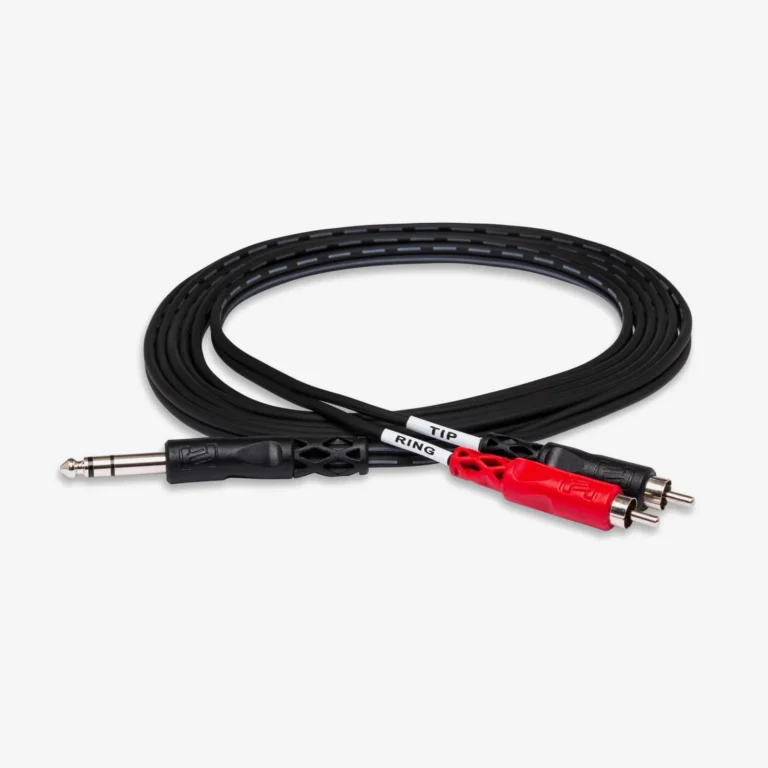
A TRS to RCA connector converts a 6.35 mm or 3.5 mm TRS jack (3-pole, balanced/stereo) into RCA plugs (2-pole, unbalanced mono). Used to connect audio interfaces, mixers, and headphone outputs to consumer hi-fi amplifiers, powered monitors, and DJ gear. Common variants: 3.5 mm TRS → 2× RCA stereo breakout, and 1/4″ TRS → mono RCA for balanced-to-unbalanced conversion.
Plugged your audio interface into a hi-fi amp and got loud humming, low volume, or no sound at all? You’ve hit the TRS-to-RCA mismatch — one of the most common headaches when bridging professional and consumer audio gear. This guide breaks down the 7 best TRS-to-RCA cables for studios, DJ rigs, and home theaters, explains the balanced-vs-unbalanced wiring conflict, and walks through the exact 4-step setup procedure that prevents speaker damage.
What Is a TRS to RCA Cable? Definition and Use Cases
A TRS to RCA cable is an audio adapter that converts signals from a TRS (Tip-Ring-Sleeve) connector — common on professional audio gear — to RCA (also called phono) connectors found on consumer hi-fi equipment. According to Focusrite’s balanced audio guide, the conversion isn’t just a physical adapter — it electrically converts signal types between two incompatible standards.
| Connector | Type | Conductors | Typical Devices |
|---|---|---|---|
| TRS | 6.35 mm (1/4″) or 3.5 mm (1/8″) | 3-pole (Tip-Ring-Sleeve) | Audio interfaces, mixers, studio monitors, headphone outputs |
| RCA | Standard “phono” plug | 2-pole (center pin + outer shell) | Hi-fi receivers, DJ mixers, TVs, powered subwoofers, turntables |
The TRS connector carries either balanced mono or unbalanced stereo depending on the source device, while RCA strictly carries unbalanced mono signals — one plug per channel. This means a TRS-to-RCA conversion always sacrifices either the noise rejection of balanced audio or the simplicity of a single-cable stereo connection.
When Do You Need a TRS to RCA Cable?
There are three real-world scenarios where this adapter is essential:
- Stereo Breakout (3.5 mm TRS → 2× RCA) — Connect a smartphone, laptop, or DJ headphone output to a home stereo or powered speaker system with separate L/R RCA inputs.
- Balanced-to-Unbalanced Conversion (1/4″ TRS → RCA) — Connect a professional audio interface (e.g., Focusrite, MOTU, RME) with balanced TRS outputs to a consumer-grade hi-fi amplifier, powered monitor, or subwoofer with RCA inputs.
- Mixer Send/Insert Point (Y-cable TRS → 2× TS/RCA) — Split a mixing console’s TRS insert point into separate send and return paths for external effects processors.
For more on TRS’s role in audio systems, see our companion guides on TRS connector sizes and wiring and TRS jack connector uses.
7 Best TRS to RCA Cables: From Budget to Audiophile
Cable choice impacts noise floor, durability, and signal integrity — especially on runs longer than 3 m (10 ft). The 7 cables below are organized from budget to audiophile-grade, with notes on which scenarios each fits best.
1. Hosa CPR-202 Dual 1/4″ TS to Dual RCA (Budget Standard)
- Format: 2× 1/4″ TS plugs ↔ 2× RCA plugs
- Price range: $10–15 (varies by length)
- Best for: DJ mixer-to-amplifier connections, basic home studio monitor cables
- Limitation: TS (not TRS), so balanced signal capability is lost
2. Mogami Gold 1/4″ TRS to RCA (Audiophile Studio)
- Format: 1/4″ TRS plug ↔ RCA plug
- Price range: $50–80
- Best for: Mastering studios, reference monitor connections, ultra-low-noise environments
- Notable feature: Mogami’s neglex quad cable construction with very low capacitance
3. AmazonBasics 3.5 mm to 2× RCA (Mobile/Laptop)
- Format: 3.5 mm TRS plug ↔ 2× RCA plugs (stereo breakout)
- Price range: $6–10
- Best for: Smartphone/laptop AUX to home stereo, casual setups
- Limitation: Thin shielding; not recommended for runs over 2 m (6 ft)
4. Roland Black Series 1/4″ TRS to RCA (Touring DJ)
- Format: 1/4″ TRS plug ↔ RCA plug
- Price range: $20–35
- Best for: Touring DJs connecting controllers to club mixers, road-rugged builds
- Notable feature: Reinforced cable jacket for repeated coiling/uncoiling
5. AudioQuest Evergreen RCA to 3.5 mm (Hi-Fi Home Theater)
- Format: 3.5 mm TRS ↔ 2× RCA
- Price range: $40–60
- Best for: High-end home theater AV receivers, audiophile listening rooms
- Notable feature: Solid long-grain copper (LGC) conductors for low distortion
6. Seismic Audio SA-Y6 (Insert Cable / Y-Splitter)
- Format: 1/4″ TRS plug ↔ 2× 1/4″ TS (or 2× RCA variants available)
- Price range: $8–15
- Best for: Mixing console insert points, splitting send/return for external effects
- Notable feature: Specifically wired as Send/Return Y-cable, not as stereo splitter
7. Monoprice Premier Series (Best Value Mid-Tier)
- Format: Multiple configurations (1/4″ TRS ↔ RCA, 3.5 mm ↔ RCA)
- Price range: $8–20
- Best for: Cost-conscious studios, project rooms, podcast setups
- Notable feature: Gold-plated connectors at budget pricing
Need a Custom TRS to RCA Solution?
The 7 cables above cover stock retail options, but professional installations often need custom-length, custom-shielded, or fully-balanced pseudo-RCA designs that off-the-shelf cables don’t deliver. As a connector assembly manufacturer, Verchil produces custom audio cable assemblies including:
- Custom-length TRS-to-RCA cables (1 m to 30 m+)
- Pseudo-balanced TRS-to-RCA configurations with ground-loop isolation
- Bulk orders for rental companies, install integrators, and AV systems
- Custom 1/4″ TRS connectors and panel-mount RCA solutions
For project quotes or custom audio assemblies, explore Verchil’s audio connector range or contact our technical team for application-specific specs.
Balanced TRS vs Unbalanced RCA: The Wiring Conflict Explained
To understand why it is important to choose a TRS to RCA connection, you must understand the signal flow. This is the most technical part of the connection and the most influential part of the sound quality.
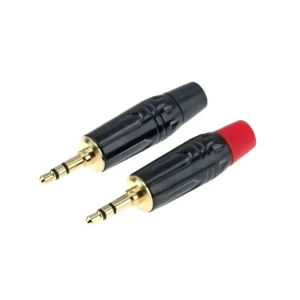
TRS Connector (3-Pole: Balanced or Stereo)
The TRS connector carries 3 conductors:
| Contact | Balanced Mono Use | Stereo Unbalanced Use |
|---|---|---|
| Tip | Positive signal (Hot/+) | Left channel |
| Ring | Negative signal (Cold/−) | Right channel |
| Sleeve | Shield/Ground | Common ground |
The same physical TRS plug carries radically different signals depending on the source device’s wiring scheme — exactly why TRS-to-RCA conversion is more nuanced than just swapping plugs.
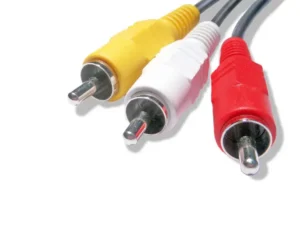
RCA Connector (2-Pole: Always Unbalanced Mono)
The RCA connector (also called “phono plug”) has only 2 conductors:
- Center Pin — carries the audio signal
- Outer Shell — serves as ground and EMI shield
By design, RCA is strictly unbalanced mono — one RCA plug per audio channel. Stereo systems require two RCA cables (typically color-coded red = right, white = left). RCA’s 2-pole design fundamentally cannot accept a balanced signal without conversion.
Why the Conflict Matters
When a balanced TRS signal converts to an unbalanced RCA, you sacrifice the common-mode rejection that gives balanced audio its noise-rejection advantage. Per Totem Acoustic’s balanced vs unbalanced reference, there are two wiring approaches when shorting balanced TRS to unbalanced RCA — and they affect noise performance differently:
- Short Ring to Sleeve (most common): TRS Tip → RCA center pin, Ring + Sleeve both → RCA shell. Works for cable runs under 5 m (16 ft) without audible noise.
- Leave Ring unconnected (pseudo-balanced): TRS Tip → RCA center pin, Ring → unconnected at RCA end, Sleeve → RCA shell. Preserves more noise rejection in electronically-balanced output gear.
According to miniDSP’s official TRS-to-RCA recommendation, method 2 is preferred for professional balanced outputs to minimize signal degradation.
Either way, a balanced source feeding an unbalanced destination produces an unbalanced connection — no cable design can restore lost noise immunity. Keep runs short (under 3 m / 10 ft when possible) for cleanest results.
| Feature | TRS (Tip-Ring-Sleeve) | TS (Tip-Sleeve) | RCA (Phono) |
|---|---|---|---|
| Conductors | 3 (Tip + Ring + Sleeve) | 2 (Tip + Sleeve) | 2 (Pin + Shell) |
| Signal Type | Balanced mono OR stereo unbalanced | Unbalanced mono | Unbalanced mono |
| Common Use | Studio monitors, audio interfaces, headphones | Guitars, patch cables, instrument | DJ mixers, hi-fi, TVs, turntables |
| Noise Rejection | High (if balanced) | Low | Low |
| Cable Length Limit | Up to 30 m (balanced) / 5 m (stereo) | 5 m | 3–5 m |
| Typical Signal Level | +4 dBu (pro) / −10 dBV (consumer) | Instrument or line | Consumer line: −10 dBV |
How to Connect TRS to RCA: 4-Step Setup Procedure
The use of TRS to RCA connectors is usually plug-and-play, but the following steps can be followed to ensure that the speaker is not damaged or a huge burst sound occurs.
Step 1 — Turn All Volume to Zero First
Before plugging anything in, turn the source device (audio interface, mixer, computer) and the destination device (amplifier, powered speakers) volume controls to zero. Insertion creates brief electrical transients that can produce loud pops capable of damaging speaker drivers and tweeters — especially in tweeters, which are far more vulnerable than woofers.
Step 2 — Identify Your TRS Output Configuration
Determine the TRS output type on your source device before selecting a cable:
| Source Output | Cable Type Needed |
|---|---|
| Single 3.5 mm headphone jack (stereo) | 3.5 mm TRS to 2× RCA Y-cable (stereo breakout) |
| Dual 1/4″ TRS outputs (balanced L/R) | 2× separate 1/4″ TS-to-RCA cables (TS plug intentionally unbalances the connection) |
| Single 1/4″ TRS (mono balanced) | 1× 1/4″ TS-to-RCA cable |
| TRS insert point (Send/Return) | Y-cable: 1× 1/4″ TRS to 2× TS (or RCA) |
Step 3 — Match RCA Color Coding Correctly
RCA connectors follow a strict universal color convention:
- 🔴 Red RCA → Right channel
- ⚪ White (or black) RCA → Left channel
Memory aid: “R for Red, R for Right”. Reversing left/right won’t damage anything, but creates an inverted stereo image (instruments and vocals appearing on the opposite side from where they were mixed).
Step 4 — Power-On Test in the Correct Sequence
Power up in this exact order to avoid speaker damage:
- Turn on the source device first (audio interface, mixer, computer)
- Wait 10 seconds for source output to stabilize
- Turn on the amplifier or powered speakers last
- Slowly raise the source device’s output volume to about 50%
- Then gradually raise the amplifier/speaker volume to your target listening level
Listen carefully during ramp-up. If you hear hum, buzz, or distortion that gets louder with volume, see the troubleshooting section below.
TRS to RCA Troubleshooting: 3 Common Problems & Fixes
Even if you use a high-quality TRS to RCA cable, you may still encounter audio loops. The following is the repair method.
Problem 1 — Constant Hum or Buzz (Ground Loop)
Symptom: A steady 50 Hz or 60 Hz hum (or a related harmonic at 100/120 Hz) that’s audible whenever both devices are powered on, regardless of source audio.
Cause: Ground loop formed because both devices have separate chassis grounds connected to different points in your building’s electrical earth.
Fixes (try in order):
- Same power outlet: Plug both source and destination into the same outlet or power strip — this often eliminates the loop entirely.
- Ground-loop isolator: Insert an inline transformer-based isolator (Ebtech Hum X, Jensen DI box) between the TRS and RCA ends. These typically cost $20–80.
- Pseudo-balanced cable: Use a TRS-to-RCA cable wired with the shield connected at only one end (the “telescoping shield” or “lifted ground” technique).
Problem 2 — Audio Only from One Channel
Symptom: Sound only comes from the left or right speaker, even though both RCA cables are plugged in.
Causes (in order of likelihood):
- Wrong cable type: Using a mono TS-to-RCA cable when stereo breakout is needed (or vice versa). A 3.5 mm TRS source feeding a single RCA plug will lose one channel entirely.
- Faulty cable internal break: A single conductor inside the cable has fractured, usually near the strain relief.
- Bad RCA jack contact: Oxidation on the RCA connection point.
Fixes:
- For mobile/laptop sources, always use a stereo breakout cable (3.5 mm TRS → 2× RCA).
- For studio sources with 2× 1/4″ TRS, use two separate cables.
- Clean RCA contacts with 99% isopropyl alcohol and a cotton swab if oxidation is suspected.
Problem 3 — Signal Volume Is Too Low
Symptom: Audio plays correctly but is much quieter than expected, even at maximum volume.
Cause: Signal level mismatch between professional and consumer gear:
- Professional line level (TRS): +4 dBu (1.228 V RMS reference)
- Consumer line level (RCA): −10 dBV (0.316 V RMS reference)
- The actual level difference is ≈11.79 dB — roughly a 4× voltage ratio.
Fixes:
- Software/firmware switch: Many pro audio interfaces (Focusrite, MOTU, Universal Audio) include a software toggle to switch outputs from +4 dBu to −10 dBV. Check your device’s control panel.
- Hardware switch: Some interfaces have physical −10/+4 toggle switches on the rear panel.
- Inline attenuator/booster: If no switch exists, an inline line-level matching device (Rolls MX44, ART CleanBox) bridges the levels.
Frequently Asked Questions
Does a TRS to RCA cable reduce sound quality?
For runs under 3 m (10 ft), the audible difference is negligible in most home studios and listening environments. Converting from TRS (balanced) to RCA (unbalanced) removes the common-mode rejection that gives balanced audio its noise immunity, but the practical impact is inaudible at short distances. Over runs longer than 5 m (16 ft), expect to hear hum, RF interference, or ground-loop buzz — at which point a powered DI box or rebalancing solution is needed.
Can I use a TS cable in a TRS jack?
Yes — and it’s the recommended approach when converting balanced TRS to unbalanced RCA. Inserting a TS (Tip-Sleeve) plug into a balanced TRS jack automatically shorts the Ring (Cold/−) contact to ground via the TS plug’s longer Sleeve. This converts the signal to unbalanced cleanly, without phase issues or signal cancellation. It’s electrically safer than custom-wired TRS-to-RCA cables for most balanced-to-unbalanced scenarios.
What’s the difference between 1/4″ and 3.5 mm TRS to RCA?
The only difference is the source device’s jack size:
3.5 mm (1/8″) TRS to RCA — used for smartphones, laptops, tablets, MP3 players, and consumer audio gear. Almost always wired as stereo breakout (3.5 mm TRS → 2× RCA).
1/4″ (6.35 mm) TRS to RCA — used for professional audio interfaces, mixing consoles, DJ controllers, and musical instruments. Usually wired as balanced-to-unbalanced mono (one cable per channel).
For details on TRS sizes generally, see Verchil’s TRS connector sizes guide.
Can I damage my speakers with the wrong TRS to RCA setup?
Yes — but the cable itself isn’t the danger. Speaker damage comes from transient pops when plugging in cables with the volume up, or from feeding amplifier output (speaker-level signals) into a line-level RCA input. The cable wiring rarely causes damage on its own. Always follow the Step 4 power-on sequence: source first, amp last, volumes at zero during connection.
Why does my balanced TRS output sound thin through an RCA cable?
This often indicates phase cancellation caused by an incorrectly wired TRS-to-RCA cable. If both the Tip and Ring are accidentally summed to the RCA pin without inverting one, the original balanced signal mostly cancels itself out — vocals and center-mixed instruments disappear, leaving only stereo-only reverb. The fix is using a proper Tip-only TRS-to-RCA cable, or using a TS plug into the TRS jack instead.
Should I get a balanced or unbalanced TRS to RCA cable?
There’s no such thing as a “balanced” RCA cable — RCA is inherently unbalanced by design (2-pole only). However, you can choose between:
Standard wiring: Tip → RCA pin, Ring + Sleeve → RCA shell. Best for short runs under 5 m.
Pseudo-balanced / telescoping shield: Tip → RCA pin, Sleeve → RCA shell, Ring lifted (one-side ground). Preserves more noise rejection for runs over 5 m.
The pseudo-balanced approach is the preferred professional method per miniDSP’s technical recommendation.
How long can a TRS to RCA cable run before audio quality degrades?
Practical maximum lengths vary by signal type:
Unbalanced stereo (3.5 mm TRS → 2× RCA): Up to 3 m (10 ft) — noise becomes audible beyond this.
Balanced-to-unbalanced (1/4″ TRS → mono RCA): Up to 5 m (16 ft) with quality shielded cable.
For runs beyond 5 m: Use a DI box, line transformer, or stay fully balanced (TRS-to-TRS or XLR end-to-end) — converting to RCA at the destination.
Conclusion
The right TRS-to-RCA cable bridges the gap between professional and consumer audio gear — and choosing wrong introduces hum, low volume, or one-sided audio. Three golden rules: keep cable runs under 3 m for unbalanced and under 5 m for balanced-to-unbalanced conversions; match cable type to source (stereo breakout for 3.5 mm sources, mono per-channel for 1/4″ pro outputs); always power on the source first, the amplifier last.
For custom-length TRS-to-RCA assemblies or bulk orders, explore Verchil’s audio connector range or contact our technical team. For deeper TRS-related guides, see our TRS jack connector uses guide and TRS vs TRRS connector comparison.