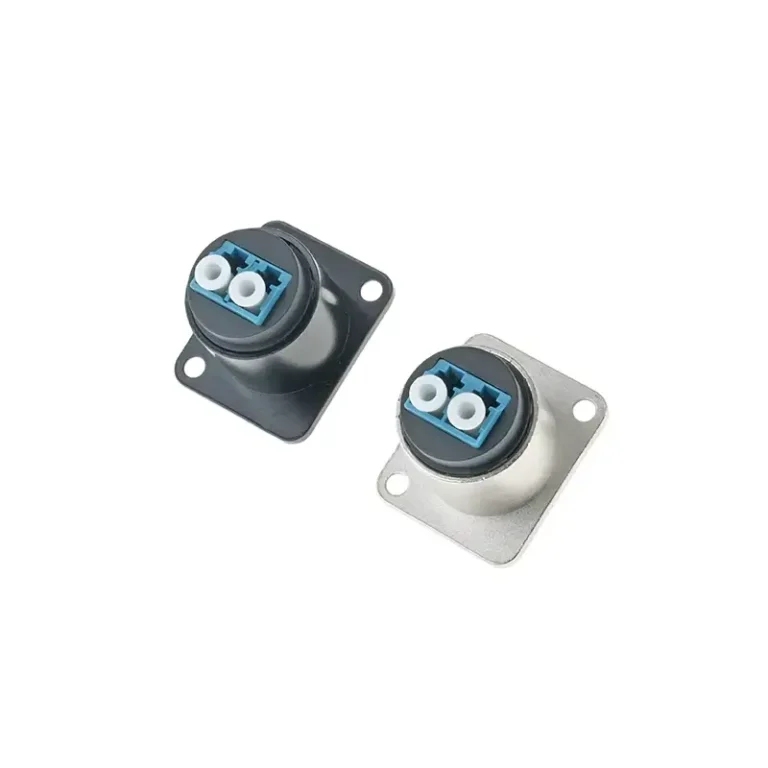
An LC panel mount is a fiber optic adapter fixed permanently on a patch panel, wall plate, or chassis faceplate. It couples two LC fiber connectors in precise alignment so cables can be plugged repeatedly with minimal insertion loss (≤0.3 dB). Its compact 1.25 mm ferrule fits up to 48 duplex ports in 1U — double the density of SC.
Building a new data center rack or upgrading an enterprise fiber network? Whether you’re wiring a small server room or a hyperscale facility, the LC panel mount you choose determines whether the network runs cleanly or suffers signal loss and dropouts. Because the right adapter keeps ferrules aligned and protected, it’s one of the most important decisions in any fiber build. This guide covers the definition, key advantages, the 5 best types, step-by-step installation, and a selection comparison table.
What is LC panel mount connector?
The LC panel mount is a fiber optic adapter assembly designed for permanent installation on a patch panel, wall plate, or chassis faceplate. Because it fixes one or more LC (Lucent Connector) adapters in place, incoming and outgoing fiber cables can be plugged repeatedly without disturbing the underlying infrastructure.
Developed by Lucent Technologies in the 1990s, the LC connector uses a 1.25 mm ceramic ferrule — exactly half the SC ferrule (2.5 mm) — with a secure push-pull latch. Because this compact design doubles port density, LC is the mainstream choice for high-density frames and modern SFP/SFP+ modules.
After being installed on the panel, the LC adapter acts as a stable coupler between the two fiber jumpers, so that the plugs at both ends are accurately aligned, thereby minimizing the insertion loss. The insertion loss of high-quality LC panel mount connectors can be as low as ≤ 0.3dB, and high-end products using high-precision ceramic plugs can even reach below 0.12dB.
Small knowledge
A standard 1U rack wiring rack after installation of LC duplex adapter can accommodate 48 optical port. If you use the SC connector to achieve the same density, you need to take up 2U rack space-double the installation area.
Why does the fiber network need a reliable LC panel mount?
Because a loose connector bends as the cable moves — introducing micro-bending loss — and because an unprotected ferrule collects dust (a leading cause of fiber failure), choosing the right fiber optic panel mount matters. A quality LC panel mount solves these problems:
A suitable LC panel mount can solve the above problems from the following aspects:
Mechanical stability: the adapter is firmly fixed on the panel, only the jumper moves when connected or disconnected, and the underlying infrastructure is not disturbed.
Physical protection: The dust cap and seal housing keep the plug face clean between the two connections.
Scalability: The modular panel allows ports to be added or reconfigured without interfering with existing cabling.
Polarity management: The panel adapter makes the full-link Tx/Rx polarity management more standardized and intuitive.
Standard compliance: high-quality LC panel installation components are in line with TIA-568 and ISO/IEC 11801 cabling standards.
All in all, high-quality LC panel mounts are the structural core to keep the fiber infrastructure clean and orderly, low-loss, and easy to maintain for a long time.
Inside a server room, distance is not what decides the part — the runs are short by definition. What decides it is what a run passes on the way across the floor, and whether the mated pair sits behind a fixed face when somebody reaches into a dense patch field. Verchil works that through as the network plane of a server room build, alongside the copper and console interfaces sharing the same frame.
5 Best LC Panel Mount Types (and When to Use Each)
Not all LC panel installation solutions are the same. The following introduces the five most representative types and their most applicable application scenarios.
Type 1
LC duplex snap-fit adapter wiring frame
The snap-in duplex adapter wiring frame is the most widely deployed form of LC panel mount. It jams side-by-side LC duplex adapters into pre-slotted holes in 1U or 2U panels. Each duplex port carries a bidirectional fiber link (Tx+Rx), which is a natural choice for standard SFP and SFP+ switch connections.
Applicable scenarios: data center rack top (ToR) switch, enterprise server room
Typical port density: 24 or 48 LC duplex ports per 1U
Polish type: UPC (blue) or APC (green)
Type 2
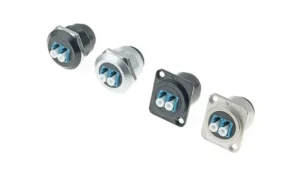
LC simplex flange wall adapter (Bulkhead Adapter)
The LC bulkhead adapter is a single-port, flange-mounted connector designed for permanent panel installation. The threaded nut or snap ring secures it through a punching hole on a metal or plastic panel. LC through-wall adapters are commonly used in industrial cabinets, outdoor control cabinets, and custom equipment cabinets. These occasions have higher requirements for dust and moistureproof sealing of connector openings.
Applicable scenarios: industrial control system, outdoor cabinet, equipment chassis
Core advantage: each port can be flexible, independent layout
Protection level: some models with protective cap up to IP67

Type 3
MPO to LC module box panel mount
For ultra-high density installation scenarios, MPO to LC module box (cassette) is the most powerful LC panel mount solution at present. The module box slides into the rack frame, and the back end is connected to the MPO/MTP trunk cable. The front end splits the trunk into 6,8 or 12 independent LC duplex ports.
This design is very suitable for the pre-terminated cabling of ultra-large-scale data centers, as well as the 40G/100G network deployment scenario where a 12-core MPO cable can be instantly allocated to six 10G switch ports, and the entire process can be completed through an LC adapter panel module.
Applicable scenarios: high-density data center, 40G/100G network upgrade migration
Typical density: 144-576 LC ports can be realized in 4U of space with a stacked module box
Core advantages: Modular design, module box can be replaced without tools

Type 4
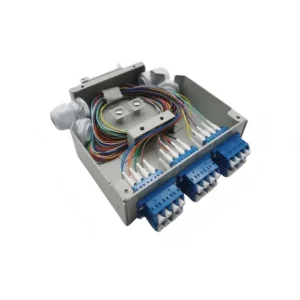
Wall-mounted LC optical fiber wiring frame
Not all installation environments are equipped with standard 19-inch cabinets. The wall-mounted LC optical fiber wiring rack can be directly installed on the wiring rack, concrete wall or metal surface. Compact and self-contained, it typically integrates fiber optic adapter panels, small splice trays, and cable management hooks into a waterproof housing.
Applicable scenarios: building access room, telecom room, small branch office
Number of common ports: 6, 12, or 24 LC duplex ports
Optional outdoor model, in line with NEMA protection standards

Type 5
DIN rail type LC panel installation module
The DIN-rail LC module clips onto a standard 35 mm DIN rail – an installation system commonly used in industrial control panels and electrical distribution cabinets. These modules are lightweight and can be installed without tools. They are designed to withstand common vibrations and temperature changes in factory and utility environments.
Applicable scenarios: industrial automation, public facilities control room, transportation system
Core advantages: no additional rack equipment required, direct use of existing DIN rail infrastructure
Commonly used fiber types: OS2 single-mode or OM4 multimode
LC Panel Mount Comparison Table
| Type | Best Use Case | Port Density (1U) | Modular? | IP Rating Option |
|---|---|---|---|---|
| LC Duplex Snap-In Panel | Data center, enterprise | 24–48 duplex | Yes | No |
| LC Simplex Bulkhead Adapter | Industrial / outdoor enclosures | 1 per hole | Yes | Up to IP67 |
| MPO-to-LC Cassette Panel | Hyperscale / 40G–100G | Up to 144+ | Yes (cassette) | No |
| Wall-Mount LC Patch Panel | Branch offices / entry points | 6–24 duplex | Varies | NEMA 4 versions |
| DIN-Rail LC Module | Industrial / utility | 2–12 duplex | Yes | IP65 versions |
How to select the appropriate LC panel mount: key specification verification
Single-mode vs. Multi-mode
Make sure that the LC adapter panel matches the fiber mode. The single-mode (OS2) adapter is usually a blue or green shell; multimode (OM3/OM4/OM5) adapters are usually beige or aqua shells. Even if the connector shape can be inserted, mixing different transmission modes will still cause serious signal loss.
UPC Polish vs APC Polish
Because the polish type directly affects return loss, choose carefully. UPC (Ultra Physical Contact, blue) suits most data and LAN applications. Because APC (Angled Physical Contact, green) uses an 8° angled endface to deflect reflected light away from the core, it’s essential for PON, CATV, and high-sensitivity systems. Never mate UPC to APC (or vice versa) — the mismatch physically scratches the ferrule. Per ServeTheHome’s fiber polish guide, keep polish conventions consistent across each link.
LC adapter color code: what blue, green, beige and aqua mean
The color of an LC adapter or connector boot is not decoration — under the TIA-598 standard it tells you the fiber type and polish at a glance, so you never mate the wrong grade of fiber across a panel.
| Adapter / boot color | Fiber type | Polish | Where it fits |
|---|---|---|---|
| Blue | Single-mode (OS1/OS2) | UPC (flat) | General single-mode: telecom, backbone, long-haul |
| Green | Single-mode (OS1/OS2) | APC (8° angled) | Low-return-loss links: FTTx, RF/CATV video, PON |
| Beige | Multimode OM1 (62.5 µm) | PC/UPC | Legacy multimode, short 1–10 Gb/s runs |
| Aqua | Multimode OM3 / OM4 (50 µm) | PC/UPC | 10G–100G data center, high-speed multimode |
Two rules that follow from the table:
- Green (APC) and blue (UPC) must never be mated. An angled APC ferrule against a flat UPC ferrule leaves an air gap, spikes insertion loss and can physically damage the endface. Keep APC panels green end-to-end.
- Color is a guide, not a guarantee. OM4 is sometimes coded violet (erika) and OM5 is lime green, and vendors do vary — always confirm the fiber type from the cable label or test report, not the color alone.
Simplex vs Duplex
For a standard bidirectional link (separate Tx and Rx fibers), choose a duplex LC adapter. When using WDM over a single fiber or for special device interfaces, choose a simplex adapter.
Panel material and environmental protection level
For the deployment of indoor server room, steel or aluminum snap-on wiring rack can meet the demand. For installation of LC panel mounts for outdoor or industrial scenarios, cabinets with at least NEMA 4 or IP65 protection are selected to resist dust, moisture and condensate erosion.
LC panel mount step-by-step installation guide
After following the standardized process, the installation of the LC panel mount is actually not complicated. The following is a proven on-site installation workflow:
Planning layout. Determine the total number of fiber cores required, port density, and available rack unit (U-bit) space. Refer to the comparison table above to confirm the most suitable panel type.
Install panel chassis. The 1U chassis or wall-mounted box is fixed at the target position. Ensure that the minimum bending radius of the fiber can be maintained during routing (usually 10 times the diameter of the cable).
Install LC adapter module. The LC wall adapter or adapter panel is stuck or spun into the panel slot. Confirm that the color code matches the fiber mode (blue = single mode/UPC, green = single mode/APC, beige/water green = multimode).
Terminate or connect the trunk cable — If pre-terminated, plug the factory connector directly into the back of the LC adapter. If field-terminated, follow the manufacturer’s polish specifications and inspect each endface with a fiber microscope before mating.
Connect the jumper at the front end. Plug the LC jumper into the front-end adapter port of the panel to connect the switch, optical module or downstream distribution frame. Because a Tx-to-Tx polarity error breaks the link entirely, confirm correct Tx/Rx polarity before powering on.
Test and file. Use optical power meter or OTDR to verify whether the insertion loss is up to standard (each connection point ≤0.3dB is an industry standard; end-to-end ≤0.5 dB is the typical acceptance threshold). Label each port and update the relevant document records.
Verchil recommends
Because contamination is the primary cause of high insertion loss, always inspect the ferrule endface with a fiber microscope before mating — a one-click cleaner takes 5 seconds but saves hours of troubleshooting.
LC panel mount vs. SC panel mount: Which is better?
In almost all modern deployment scenarios today, the LC panel mount is a clear preferred solution for three main reasons:
- Density advantage: 1U LC panel can accommodate up to 48 duplex ports, while the same specification SC panel can only accommodate 24. For space-constrained data centers and high-density switching environments, LC can achieve twice the connection density in the same rack unit.
- Optical module compatibility: Most of today’s SFP, SFP+, SFP28 and QSFP branch optical modules use LC interface, making LC the default standard choice for modern networks.
- Performance equivalence: Although the LC connector is only half the size of the SC, its insertion loss and return loss performance are exactly the same as the SC under correct installation conditions with precision ceramic inserts.
The SC panel mount still has its place in old enterprise systems and some FTTH (Fiber to the Home) access networks. If you need to maintain your existing SC infrastructure, you can mix LC to SC hybrid adapters in your fiber optic distribution rack to be compatible with both connector types without changing the cable.

LC panel mount common installation errors
Ignoring the minimum bending radius of optical fiber
Fiber optic cables have the minimum bending radius of the hard requirements, at any time must be strictly adhered to. Even a slight violation of this requirement will cause micro-bend loss, resulting in link test failure, or slow degradation of the signal over time. When wiring inside the chassis, the cable should be kept smooth and curved, and fixed with an arc cable guide.
Polish Type Mismatch
Because mating a UPC jumper to an APC adapter (or vice versa) physically scratches the ferrule endface, always verify the connector boot color matches the adapter color code.
Skip end face inspection
The factory pre-terminated pigtail looks clean, but it may have been contaminated or damaged during delivery. It is important to check each socket before docking-for the installation of LC panel mounts with a large number of ports, because a single problem connector is often extremely difficult to locate afterwards.
Polarity Not Documented
Because a duplex link requires each end’s Tx to reach the other end’s Rx, mislabeled or undocumented LC panels cause polarity confusion that can take hours to trace. Use color-coded jumpers and build an accurate port map from day one.
Frequently Asked Questions
What does ‘LC’ represent in the LC panel mount?
LC is the abbreviation of Lucent Connector, named after its developer Lucent Technologies, which was developed in the 1990s. Nowadays, LC has become one of the most widely used miniaturized fiber optic connectors in the world.
Can the LC panel mounting adapter be used for both single-mode and multi-mode fibers?
The LC adapter itself usually does not distinguish between transmission modes, but you must use the correct grinding type (UPC or APC) and ensure that the transmission mode of the jumper and the backbone fiber matches the optical module. An adapter labeled SM/MM does not mean that different transmission modes can be mixed in the same link.
What is the difference between fixed and modular LC adapter panels?
A fixed (loaded) adapter panel ships with the LC adapters — and often the pigtails — already fitted, so the field team only splices and patches; it minimizes labor when the connector type is settled and volumes repeat, but if a port is damaged or you later switch connector types, you replace the whole panel. A modular (unloaded) panel is an empty chassis you populate with the adapter plates you choose: more flexible when connector types vary across sites or you want to stock one chassis and configure it later, at the cost of buying the plates separately. Choose loaded for repeatable, fixed-type rollouts; choose unloaded when flexibility matters more than out-of-box speed.
How many LC ports can a rack unit (1U) accommodate?
The standard 1U LC fiber optic distribution frame can accommodate 24 duplex ports (a total of 48 fibers). When designing a high-density MPO-to-LC module box, the back-end uses the MPO backbone cable, and a single 1U module framework can achieve a maximum of 144 LC ports.
What level of insertion loss should be achieved for high-quality LC panel mounts?
A high-quality LC panel mount adapter should hold insertion loss to roughly ≤0.2 dB typical and ≤0.3 dB maximum per mated pair. The LC interface itself is defined by IEC 61754-20, and optical performance is graded under IEC 61753 — a “Grade B” class is the level most project specs ask for on premium single-mode links. When you approve a panel for a project, ask the vendor for the tested insertion-loss and return-loss figures rather than a nominal “low loss” claim.
What is the difference between an LC panel mount and an RJ45 panel mount?
An LC panel mount terminates fiber optic cable, while an RJ45 panel mount terminates copper Ethernet cable. Because fiber carries light and copper carries electrical signals, the two are not interchangeable — LC suits high-bandwidth, long-distance, and EMI-prone runs, while RJ45 suits standard copper LAN. For copper networks, see our RJ45 waterproof connector guide.
How do I clean an LC panel mount adapter?
Use a one-click fiber cleaner or lint-free wipe with fiber-grade alcohol, then inspect with a fiber microscope before mating. Because contamination is the leading cause of high insertion loss, follow an “inspect–clean–inspect” routine every time you mate or re-mate. When a port is unused, keep a dust cap on it to protect the sleeve.
What do the colors on an LC panel mount adapter mean?
Under TIA-598, blue LC adapters are single-mode UPC, green are single-mode APC, beige are OM1 multimode, and aqua are OM3/OM4 multimode. Never mate a green (APC) connector with a blue (UPC) one, and always confirm fiber type by the cable label rather than color alone.
Summary: Which LC panel mount is most suitable for you?
The best LC panel mount for your project depends on three core variables: usage environment, port density requirements, and future scalability planning.
For the deployment of standard data centers or enterprise server rooms, the modular LC duplex buckle adapter wiring frame is an ideal starting point-high port density, flexible configuration, and fully compatible with almost all SFP-based switches on the market. If your working environment is a factory, utility building or outdoor cabinet, you should give priority to the IP protection level LC through-wall adapter or the wall-mounted wiring rack that meets the NEMA standard to resist dust, moisture and vibration.
Fiber is one layer of a larger outdoor build — see how an LC bulkhead pairs with sealed RJ45, glands, and circular connectors in a full set of connectors for an outdoor communication node.
For networks evolving to 40G, 100G and even higher rates, it is recommended to invest in the MPO to LC module box-type fiber panel mount. Although the initial cost is high, its port density advantage and upgrade flexibility will bring huge returns every time it needs to be expanded.
No matter which scheme is selected, it is necessary to check the insertion loss specification, check the plug end face before docking, establish a polarity document record, and plan the cable bending radius from the beginning. A well-planned LC panel mount installation requires a little more time in the early stage, but it will save you a lot of troubleshooting effort in the next few years.
Because a well-planned LC panel mount installation takes a little more time upfront but saves years of troubleshooting, always verify insertion-loss specs, inspect endfaces before mating, document polarity, and plan the bending radius from the start.
Explore Verchil’s LC panel mount range and full network connector lineup, or see related guides: USB panel mount types and RJ45 waterproof connector guide. For custom fiber panel assemblies built to your port density and polish spec, contact our technical team.