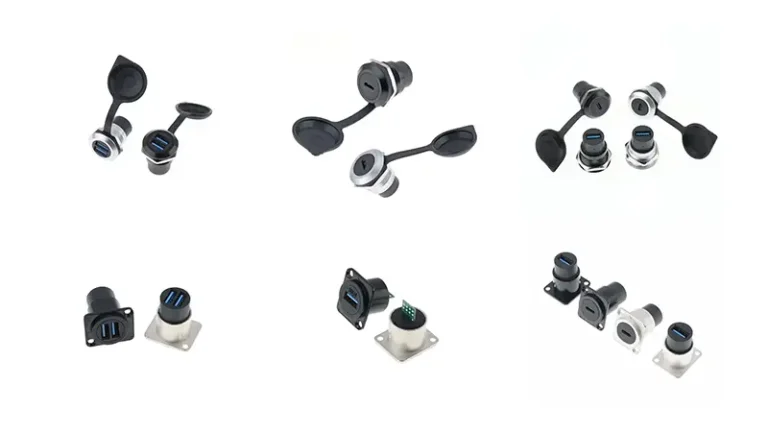
A USB panel mount connector (also called a USB bulkhead or pass-through connector) is a hardware component that routes a USB signal through a panel, chassis wall, or enclosure. It mounts permanently in a cutout, providing an accessible USB port on the outside while protecting the internal wiring. Common types include USB-A, USB-C, waterproof (IP67/IP68), and locking.
Designing an industrial cabinet, custom PC, or outdoor kiosk and need a USB port that survives real-world use? Because a panel mount connector routes USB through the enclosure wall — sealing out dust and water while protecting the internal PCB — it’s an often-underestimated component that determines long-term reliability. This guide covers the 7 main types (USB-A, USB-C, waterproof, locking, multi-port, and more), plus selection, installation, and procurement tips to help engineers decide with confidence.
What is USB Panel Mount Connector?
The USB panel mount connector — also called a USB bulkhead or pass-through connector — routes USB signals through panels, chassis walls, or cabinets. Unlike a standard internal USB port soldered to a PCB, the panel mount version fixes permanently into a rectangular or circular cutout, providing a USB port accessible on the panel’s outer surface.
These connectors are widely used in the following industries:
- Industrial automation and PLC control cabinet
- Custom PC chassis and game host shell
- Medical and laboratory equipment
- Embedded systems and Internet of Things (IoT) gateway hardware
- Audio and video production console and broadcasting equipment
- Outdoor self-service information terminal and public access equipment
Why do I need to install a connector using a USB panel mount?
For professional designers of custom chassis or hardened hardware, USB panel mount connectors can effectively solve the following key engineering challenges:
Strain Relief
Because the panel absorbs insertion and removal stress — rather than the internal PCB pads — a panel mount connector significantly extends service life.
Professional Appearance Quality
The flush-mounted interface has a simple and beautiful appearance, which is a clean, flush-mounted port looks far more professional than a bare internal cable run through an opening.
Environmental Sealing Protection
Waterproof USB panel mounting connector with IP protection level certification can effectively isolate dust, water and pollutants in harsh environments and protect internal circuits.
Layout Flexibility
The USB Panel Mount Extension allows designers to place the interface in an ergonomically optimal location, completely independent of the actual installation location of the internal hardware.
7 Types of USB Panel Mount Connectors Explained
USB-A Panel Mount (Type-A Bulkhead)
The USB-A panel mount connector is the most common panel mount USB interface format on the market. It provides a standard Type-A female port on the outside of the panel and is suitable for USB 2.0 and USB 3.0 application scenarios. It is widely used in charging stations, HMI man-machine interface control panels and consumer electronic equipment chassis.
- Transmission rate: USB 2.0 (480 Mbps) or USB 3.0 (5 Gbps)
- Applicable panel thickness: usually 1~6mm
- Installation method: flange screw fixed type or M type locking nut type
USB-B Panel Mount (Type-B Bulkhead)
USB-B panel mount connector is the standard configuration of professional audio equipment, scientific instruments and industrial legacy equipment. This type of connector is the female port of the device, which is suitable for the scene where the host (PC) is connected to the controlled device, such as MIDI controller, audio interface card and desktop measuring instrument.
USB-C Panel Mount Connector
Because USB-C is reversible and supports USB 3.1/3.2 Gen 2 (10 Gbps), Power Delivery (up to 100W), and DisplayPort Alt Mode, it’s the most versatile and future-proof panel mount option. Key specs at a glance:
- Transmission rate: USB 3.1 Gen 1 (5 Gbps) or Gen 2 (10 Gbps)
- Power (PD): 5–20V, up to 5A (100W)
- Reversible: no need to orient the plug
- Alt Mode: some models support DisplayPort and Thunderbolt
💡 USB-C panel mounts have enough depth to warrant their own guide. For full coverage — PD negotiation, Alt Mode wiring, IP67 USB-C variants, and selection — see our dedicated USB-C panel mount guide.
Waterproof USB Panel Mount (IP67/IP68)
Waterproof USB panel mount connectors are the only reliable option for outdoor chassis, shipboard electronic equipment, and industrial environments that are threatened by moisture and particle pollution. These connectors are equipped with silicone-sealed gaskets, dust caps and protective housings that meet IP67 (immersion depth of 1 m) or IP68 (continuous underwater use) standards.
Typical application scenarios: field reinforcement equipment, outdoor self-service terminal, ship-borne navigation console, agricultural machinery control system.
USB Panel Mount Extension Cable
The USB panel mounting extension is a pre-assembled cable assembly with a length of 30cm~1m. One end is a panel-mounted USB bus port, and the other end is a standard USB male plug. This is the easiest solution to quickly add an external USB interface to an existing chassis without any PCB-level modification.
- No welding required – purely mechanical mounting
- Provide USB 2.0, USB 3.0 and USB-C specifications.
- Supports both data transmission and charging through
- Modular design, easy to on-site maintenance and rapid replacement
Locking USB Panel Mount (Industrial Grade)
In critical mission applications where accidental disconnection will lead to system failures or safety incidents, the locked USB panel mount connector integrates a screw locking (M-shaped thread) or push-pull holding mechanism, which can firmly lock the mating plug to prevent accidental disconnection. It is suitable for industrial robots, CNC equipment and automatic test systems.
- Holding mechanism: screw locking (M type) or push-pull type
- Anti-vibration performance: suitable for Class B EMC electromagnetic compatibility environment
- Operating temperature range: -40°C to +85°C
- Typical insertion life: more than 5,000 times
Dual-Port USB Panel Mount (Multi-Port)
When the panel installation space is limited, the dual-port USB panel mounting connector can provide two interfaces in a single opening to maximize space utilization. The optional configuration includes USB-A + USB-A, USB-A + USB-C, and the combination of charging port and data transmission port. It is widely used in workstation operation panel, conference room AV equipment and public information terminal.
How to choose a suitable USB panel mount connector?
Because the right connector depends on your environment, data rate, and power needs, use this quick reference to match a type to your application:
| Selection Factor | What to Consider |
|---|---|
| USB Generation | USB 2.0 for data-light tasks; USB 3.0 / USB-C for high-speed data or video |
| Panel Thickness | Confirm connector body fits your enclosure wall (typically 1–6 mm range) |
| Environment | Choose IP67/IP68 waterproof USB panel mount for outdoor or industrial use |
| Power / Charging | USB-C with Power Delivery for applications requiring >10W charging |
| Vibration / Security | Locking variants for CNC, robotics, or any high-vibration environment |
| Future-Proofing | USB-C panel mount connector for long-term device ecosystem compatibility |
| Port Density | Dual-port panel mount when space is limited but two connections are needed |
USB Panel Mount Connector Installation Steps
The installation can be completed with only basic tools, and the operation process is as follows:
Cutting or punching panel openings – Referring to the precise hole size in the connector data manual, the standard USB-A interface needs to cut a rectangular opening.
Remove burrs and clean openings – Remove burrs at the cutting edge to avoid damage to the connector seal or housing.
Insert from the outside — Because the connector seats from the panel’s exterior, push it through the cutout from outside the chassis.
Fix from the inside with a locking nut or screw – Because over-torquing can crack a thermoplastic shell, tighten the locking nut firmly but not excessively.
Route the internal cable – connect the pigtail or cable assembly to the PCB, USB hub, or controller.
Complete the test before closing the cover – verify the signal integrity and mechanical stability, and the IP seal model must simultaneously verify the waterproof sealing effect.
USB Panel Mount vs PCB-Mounted USB
| Feature | USB Panel Mount | PCB-Mounted USB |
|---|---|---|
| Mechanical Stress | Distributed across panel | Concentrated on PCB pads |
| Layout Flexibility | High — position anywhere | Fixed by PCB location |
| Field Replacement | Easy — no soldering | Requires rework station |
| Professional Appearance | Excellent, flush finish | Variable |
| Vibration Resistance | High (locking types) | Moderate |
| Cost | Slightly higher | Lower initial cost |
Pre-procurement checklist
Must check items before purchasing:
- Confirm the required USB protocol version (USB 2.0/USB 3.0/USB-C).
- The thickness of the chassis panel is measured and matched with the connector specifications.
- Verify the requirements of the use environment for IP protection level.
- Confirm the maximum current rating required for charging applications.
- Evaluate whether there are vibration or safety requirements and decide whether to choose a locking type.
- Be sure to consult the precise hole size in the data manual before processing the hole.
- When installing the extension cable using the USB panel, make sure that the cable length meets the requirements.
High-quality USB panel installation connector procurement channels
Professional and industrial projects are recommended to purchase from well-known manufacturers. The following are the main recommended sources:
Verchil: Professional USB panel mount connector series designed for industrial and professional application scenarios. The product covers a variety of specifications such as USB-A, USB-C, waterproof type (IP67/IP68) and locking type, provides a rigorously tested mass production ready solution, and is equipped with complete technical support services – the preferred brand for engineers seeking reliable panel USB connection solutions.
Amphenol ICC: The world’s leading manufacturer of industrial panel mounted USB connectors, offering a wide range of IP protection certification and locking product lines for harsh operating conditions.
Molex: provides a complete portfolio of USB-A and USB-C panel mounting products, industrial and automotive product lines are particularly powerful.
Adafruit: A high-quality source of USB panel mounting extension line components. The product form is friendly to makers and prototype development.
Frequently Asked Questions
What is the difference between the USB panel mounting connector and the ordinary USB interface?
The ordinary USB interface is directly installed on the PCB by welding or plug-in; the USB panel mounting connector is mechanically fixed to the chassis panel, the inner side is connected to the lead wire, and the outer side provides an accessible USB interface. Its core advantages include: better stress release protection, more professional appearance quality, environmental sealing protection (IP67/IP68), and flexible layout capability that is not limited by PCB location.
What does the IP67 and IP68 of the waterproof USB panel mounting connector mean?
The IP (Ingress Protection) rating standard is used to define the connector’s ability to protect against solid particles and liquids:
IP67 – completely dustproof; it can be immersed in water for 30 minutes at a depth of 1 m without being affected.
IP68 – completely dustproof; continuous immersion in more than 1 m of water depth (specified by the manufacturer)
The above protection level is suitable for the connector in the state of insertion or installation of dust cover. For outdoor self-service terminals, ship-borne navigation consoles and field operation equipment, it is recommended to install connectors with waterproof USB panels of IP67 protection level at a minimum.
Can the USB panel mounting connector support USB 3.0 transmission rate?
Yes. USB 3.0 specification USB panel mount connectors have been widely used in USB-A and USB-C forms, and can support SuperSpeed ultra-high-speed transmission: USB 3.0/USB 3.1 Gen 1 (5 Gbps) or USB 3.1 Gen 2 (10 Gbps). The selection must ensure that the internal lead-out cable assembly also meets the USB 3.0 specification – the cable quality is not up to standard is one of the most common reasons for the abnormal decrease of transmission rate in the custom chassis.
What is the applicable panel thickness range for USB panel mounting connectors?
Most standard USB panel mount connectors are suitable for panels between 1mm and 6mm thick. Before processing holes, it is necessary to consult the manufacturer’s data manual to confirm the precise adaptation range. If the wall thickness of the chassis is abnormal (such as cast aluminum shell), special products with extended thread type or deepened body type can be selected from professional connector suppliers.
Can USB-C panel mount connector support USB PD power transfer protocol charging?
Yes, but it is necessary to select a model that clearly indicates support for USB Power Delivery. When charging up to 100W (20V/5A) PD, the USB panel mounting connector body, internal cable components and related circuits must meet the requirements of high current conditions. When purchasing, please verify whether the product conforms to the USB PD 3.0 specification. This feature is particularly critical for laptop charging stations, industrial equipment docking panels, and embedded system chassis that require high-power power supply.
What are the typical Mating Cycles of the USB panel mount connector?
The rated life of a consumer USB connector is usually about 1,500 times. The rated plug-in life of industrial grade USB panel mount connectors is usually more than 5,000 times. For high-frequency plug-in application scenarios – such as public charging stations, shared industrial terminals – it is recommended to select products with a rated plug-in life of at least 2 times more than the expected number of uses to ensure long-term reliable operation.
Should I choose a USB or fiber (LC) panel mount for my project?
Choose a USB panel mount for data and power to peripherals over short distances; choose a fiber LC panel mount for high-bandwidth, long-distance, or EMI-prone runs. Because USB carries both data and power over copper (up to 100W with USB-C PD), it suits control panels, kiosks, and industrial cabinets. Because fiber carries light with no EMI and far greater reach, LC suits data centers and backbone links. See our LC panel mount guide for the fiber option.
Summary
Although choosing a USB panel mount seems like a small detail, it profoundly affects a product’s overall quality and lifespan. Whether you need a basic USB-A extension for a custom chassis or an IP68 waterproof USB-C connector for outdoor equipment, there’s a purpose-built solution for every application. Because the right choice depends on environment, data rate, power, and mechanical constraints, weigh each factor from this guide to build a cleaner, more reliable, longer-lasting product.
Explore Verchil’s USB panel mount range and full network connector lineup, or see related guides: USB-C panel mount guide, LC panel mount guide, and RJ45 waterproof connector guide. For specification help, contact Verchil’s engineering team.