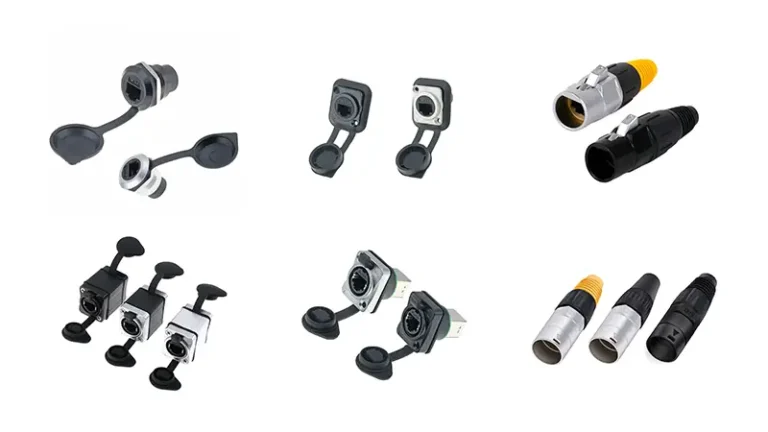
An RJ45 waterproof connector is a sealed Ethernet coupler rated IP67 to IP68, designed to protect Cat5e through Cat6a connections from rain, dust, and corrosion in outdoor environments. Built with UV-stable nylon (PA66) or zinc alloy housings and silicone gaskets, it maintains gigabit data speeds and supports PoE up to 90 W under continuous weather exposure.
Is your outdoor IP camera dropping signal after every rainstorm? Standard RJ45 plugs were never built to survive moisture—they corrode within months, sometimes within weeks under PoE current. This guide explains exactly what an RJ45 waterproof connector does, the 5 specifications that actually determine outdoor reliability, and how to install one correctly so your network stays online through every weather condition. Backed by IEC 60529 IP rating standards and field-tested practices.
For the standard, non-waterproof RJ45 connector — what it is, how it’s wired, and its couplers — see the RJ45 connector guide; this page focuses on the sealed, outdoor versions.
What Is an RJ45 Waterproof Connector and Why Standard Plugs Fail Outdoors?
An RJ45 waterproof connector is a sealed Ethernet coupler engineered to protect the 8 copper contacts inside a Cat5e/Cat6/Cat6a connection from moisture, dust, oil, salt spray, and extreme temperatures. Unlike standard plastic RJ45 jacks on indoor routers, waterproof versions feature die-cast or UV-stabilized PA66 housings, silicone O-rings, threaded compression glands, and screw or bayonet locking mechanisms.
The result: gold-plated contacts stay dry and corrosion-free, supporting full gigabit (1 Gbps) or 10 Gbps speeds even when installed on rooftops, ship masts, or factory wash-down lines exposed to constant water spray.
According to Amphenol’s industrial RJ45 guide, quality waterproof RJ45 connectors should handle at least 500 insertion cycles without seal degradation—roughly 5× the lifespan of standard indoor RJ45 plugs.
Browse Verchil’s range of RJ45 waterproof connectors for IP67- and IP68-rated solutions compatible with Cat5e through Cat6a cables.
Want to gain a deeper understanding of how IP ratings affect waterproof RJ45 connectors? Check out this article: IP65 RJ45 Waterproof Connector: Specs & Picks
3 Failure Modes That Destroy Unsealed Outdoor RJ45 Connections
Electrical tape is the most common field workaround—and the most common cause of camera and access-point failure 6–12 months after installation. Tape adhesive softens in UV exposure, peels in heat cycles, and traps condensation against the metal contacts. Here are the three failure modes a proper RJ45 waterproof connector prevents.
1. Galvanic Corrosion Under PoE Current
When Power over Ethernet (PoE) current flows through copper contacts in the presence of moisture, galvanic corrosion accelerates by an order of magnitude compared to dry conditions. The result is intermittent signal loss within weeks and complete hardware failure—often the IP camera or access point itself, not just the connector—within 6–18 months. A sealed connector blocks moisture from acting as an electrolyte across the contact surfaces.
2. Physical Strain Relief
Outdoor cables experience constant wind loading, vibration, and accidental tugs from maintenance staff or wildlife. A properly designed waterproof connector includes an integrated compression gland that grips the cable jacket—not just the plug—relieving mechanical stress so that the internal twisted pairs are not pulled away from the contacts. Without strain relief, even a single hard tug can fracture a single pair and degrade gigabit performance.
3. UV Embrittlement and Temperature Cycling
Standard ABS plastic RJ45 housings turn brittle and crack within 12–24 months of direct sun exposure. Quality waterproof connectors use UV-stabilized PA66 nylon or zinc alloy, with rated operating temperatures typically spanning −40 °C to +105 °C—wide enough to survive both desert rooftop installations and freezing northern winters without seal failure or housing fracture.
How to Choose the Right RJ45 Waterproof Connector: 5 Critical Specs
Not all “waterproof” RJ45 connectors deliver equal protection. Before purchasing, verify these 5 specifications against your actual installation environment.
Tip 1 — Verify the IP Rating (IP67 vs IP68)
The Ingress Protection (IP) rating, defined under IEC 60529, is the single most critical specification.
- IP67 — Fully dust-tight; withstands temporary immersion to 1 m depth for 30 minutes. Suitable for rain exposure, splash environments, and rooftop CCTV installations.
- IP68 — Fully dust-tight; designed for continuous immersion under pressure. The required rating for marine equipment, direct burial, and heavy industrial wash-down environments.
⚠️ Critical check: Confirm the IP rating applies to the fully mated and locked connector, not the housing in isolation. Many product listings advertise IP68 housings that only achieve IP67 once a cable passes through them.
Tip 2 — Match Shielding (STP vs UTP)
If your installation uses shielded Ethernet cable (STP, FTP, or S/FTP) to suppress electromagnetic interference from nearby motors, drives, or radio equipment, the connector must also be shielded—either a full metal shell or a metal-lined plastic body. Pairing a shielded cable with an unshielded plastic connector breaks the ground continuity of the shield, eliminates the EMI protection you paid for, and can introduce ground-loop noise that disrupts gigabit signaling.
Tip 3 — Match the Cable Category (Cat5e / Cat6 / Cat6a)
The connector must match or exceed your cable category—a Cat5e coupler installed mid-run will downgrade an entire Cat6a network.
| Cable Category | Speed | Bandwidth | Typical Use |
|---|---|---|---|
| Cat5e | 1 Gbps | 100 MHz | Basic outdoor CCTV, access points |
| Cat6 | 1 Gbps (10 Gbps up to 55 m) | 250 MHz | HD surveillance, mid-range PoE |
| Cat6a | 10 Gbps to 100 m | 500 MHz | 4K cameras, PoE++ (90 W) |
For future-proof installations, specify Cat6a connectors even if your current cable is Cat6—the cost difference is minimal and the upgrade path is preserved.
Tip 4 — Choose the Right Locking Mechanism
- Bayonet lock (quarter-turn): Installs in seconds; ideal for temporary deployments, frequent service access, or trade-show setups.
- Threaded lock (screw-on): Slower to install but produces a tighter gasket compression and higher pull-out resistance. The standard choice for permanent installations and any IP68-rated application.
For outdoor CCTV cameras and Wi-Fi access points mounted at height where service access is rare, always specify threaded.
Tip 5 — Select the Right Housing Material
- PA66 nylon (UV-stabilized): Lightweight, corrosion-immune, UV-resistant. Standard for general outdoor use including CCTV, Wi-Fi APs, and IoT sensors.
- Zinc alloy / die-cast metal: Higher impact resistance, EMC shielding, and superior pull-out force. Required for factory wash-down lines, marine applications, and any installation subject to mechanical impact.
- Stainless steel (304/316): For coastal and offshore deployments where standard zinc alloy would corrode within 2–3 years from salt spray exposure.
Need a sealed cable entry point for non-RJ45 cables in the same enclosure? See Verchil’s waterproof cable glands.
Standard vs Waterproof RJ45 Connector: Side-by-Side Comparison
In order to help readers intuitively understand the differences, the following is the specification breakdown:
| Feature | Standard RJ45 | RJ45 Waterproof Connector |
|---|---|---|
| IP Rating | None (IP20) | IP67 / IP68 |
| Housing Material | ABS plastic | UV-stable PA66 nylon or zinc alloy |
| Gasket Seal | None | Silicone O-rings + compression gland |
| Strain Relief | Minimal | Integrated cable gland (4.5–7.5 mm) |
| Operating Temperature | 0 °C to +60 °C | −40 °C to +105 °C |
| Insertion Cycles | ~100 cycles | 500+ cycles |
| PoE Compatibility | Up to PoE+ (30 W) | Up to PoE++ (90 W) |
| Typical Application | Indoor office / home | Outdoor CCTV, marine, industrial wash-down |
Explore Verchil’s complete network connector range for panel-mount, cable-side, and bulkhead RJ45 waterproof configurations.
How to Install an RJ45 Waterproof Connector: 6-Step Guide
Most RJ45 waterproof connectors share a near-identical assembly sequence. Follow these 6 steps in order—skipping the cable-threading sequence is the #1 cause of post-installation rework.
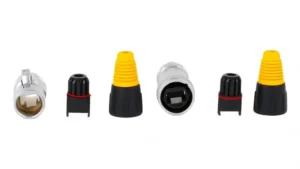
Step 1 — Disassemble the connector kit. Unscrew the three components: end cap, compression gland (with rubber grommet), and the connector body.
Step 2 — Thread the cable in the correct order. Before crimping the RJ45 plug, slide each component onto the bare Ethernet cable in this sequence: end cap → gland nut → rubber grommet → connector body. Doing this after crimping is impossible without cutting the plug off.
Step 3 — Crimp the RJ45 plug. Strip the cable to the manufacturer’s recommended length (typically 13 mm). Arrange wires per T568A or T568B and crimp using a calibrated RJ45 tool—uneven crimps are the leading cause of “no link” symptoms.
Step 4 — Insert the plug into the coupler body. Listen for the click that confirms the plastic retention tab is fully seated.
Step 5 — Tighten the compression gland. Hand-tighten only—typical torque is 2–3 N·m. Over-tightening cracks the housing and crushes the cable jacket, both of which void the IP seal.
Step 6 — Connect to the device. Screw the connector body onto the device’s panel-mount port (camera, AP, or bulkhead) until finger-tight plus a quarter turn.
⭐ Pro tip: Apply a thin coat of dielectric grease (silicone-based) to the contact pins before mating. This displaces residual moisture and prevents oxidation across the 8 contact points—standard practice in marine and offshore installations.
For device-specific installation steps, see Hikvision’s official waterproof RJ45 installation guide for IP cameras. For complex enclosure builds, contact Verchil’s technical team for pre-terminated cable assemblies.
Testing and Long-Term Maintenance for Outdoor Reliability
Many users think that they can ‘once and for all’ after installing the waterproof connector, but the outdoor environment is cruel. In order to ensure a long-term stable connection, it is essential to perform correct testing and regular maintenance.
Post-Installation Testing: Don’t Trust the Router LED
The router link LED only confirms physical-layer link—it will happily report “connected” even when 2 or 3 pairs are miswired. Run these two tests before sealing the connector:
1. Wiremap test with a dedicated cable tester. A professional wiremap tester verifies all 8 pins are correctly terminated end-to-end. For shielded installations, confirm the ground (G) line is also continuous. Tools from Fluke, Klein, or comparable brands cost under $80 and prevent costly callbacks.
2. Wiggle test under load. With the tester running, gently flex the cable at both connector exits. Any flicker in the link or activity LED indicates a marginal crimp or partial contact that will fail within weeks of vibration exposure.
Annual Maintenance Checklist
Inspect outdoor RJ45 connections at least once per year—and always after extreme weather events (typhoons, blizzards, heat waves).
- Inspect the silicone O-ring. Replace immediately if hardened, cracked, or compressed beyond 20% of original thickness. O-rings are the cheapest component and the most common failure point.
- Check for internal condensation. Translucent housings make this easy; opaque housings require disassembly. Any visible moisture means the seal has failed—dry, reapply dielectric grease, and reassemble.
- Clean the gold-plated contacts. Use 99% isopropyl alcohol on a cotton swab to remove any oxide layer. Avoid abrasive contact cleaners that strip the gold plating.
- Re-torque the compression gland. Thermal cycling slowly loosens plastic nuts. Hand-tighten with no tools; if the gland turns more than a quarter turn before resistance, the seal has degraded.
External Reference: trueCABLE – Waterproofing Outdoor RJ45 Couplers covers Cat6a-specific installation considerations.
Where RJ45 Waterproof Connectors Are Essential: 4 Real-World Applications
Outdoor IP Surveillance (CCTV)
Security cameras face year-round rain, snow, UV, and PoE current—the perfect storm for galvanic corrosion. Installers seal every cable-to-camera junction with an IP67-rated RJ45 connector, eliminating the most common cause of dead cameras: a corroded port, not a failed sensor.
Rooftop Wi-Fi and Satellite Internet
Cable runs from rooftop antennas and starlink-style satellite dishes down to indoor routers must survive 1–3 weather transitions per cable. Waterproof RJ45 connectors at the antenna terminate the outdoor run, with a standard RJ45 patch cable continuing indoors.
Industrial Automation and Food Processing
Factory floors with PLCs, vision systems, and robotic arms face daily wash-down cycles. IP69K-rated RJ45 connectors are mandatory in food-grade and pharmaceutical environments to survive high-pressure steam cleaning at up to 100 bar.
Marine and Offshore
Salt spray accelerates corrosion 10× faster than fresh-water exposure. Marine RJ45 connections—chart plotters, radar, sonar, vessel networking—require zinc alloy or stainless steel housings rated IP68 minimum, with dielectric grease at every contact.
For industry-specific connector selection, see Verchil’s connectivity solutions.
External Reference: IEC 60529 – Degrees of Protection (IP Code) defines the official IP rating test methodology referenced throughout this guide.
Waterproof RJ45 Connector vs. Waterproof Junction Box
A sealed connector and a waterproof junction box solve related but different problems. A waterproof RJ45 connector is the right choice for a clean point-to-point job: extending one cable to another, joining a camera pigtail to a backbone run, or any spot where a slim cylindrical profile matters. A waterproof junction box earns its place when you need to coil and hide cable slack, house non-sealed gear such as a PoE injector, or bring several cables together at one point. For a simple cable extension, the sealed connector is the more compact and cost-effective option.
Conclusion
An RJ45 waterproof connector is the cheapest piece of insurance you can buy for an outdoor network. A $5 sealed connector prevents the $500 camera, $2,000 access point, or $20,000 industrial controller behind it from failing prematurely. Match the IP rating to your real environment (IP67 for rain, IP68 for immersion), the cable category to your throughput (Cat6a for future-proofing), and the housing material to your corrosion risk—then install once, test properly, and inspect annually.
Frequently Asked Questions
What is the difference between IP67 and IP68 for RJ45 connectors?
IP67 connectors are fully dust-tight and survive temporary immersion in 1 m of water for 30 minutes—sufficient for rainfall, splash exposure, and rooftop CCTV. IP68 is rated for continuous immersion under pressure (specific depth and duration set by the manufacturer)—the required level for direct burial, marine equipment, and industrial wash-down environments. For coastal or offshore installations, always specify IP68 with corrosion-resistant housing materials.
Will a waterproof RJ45 connector reduce my network speed?
No, when properly specified. As long as the connector’s category rating matches or exceeds your cable (Cat6 connector for Cat6 cable, Cat6a for Cat6a, etc.) and the gold-plated contacts are clean, the throughput impact is effectively zero. Mismatches degrade speed: a Cat5e coupler in the middle of a Cat6a run will cap the entire link at 1 Gbps regardless of cable quality elsewhere.
Can I use waterproof RJ45 connectors with PoE and PoE++?
Yes—and they are strongly recommended for any PoE installation. Because PoE carries DC current (up to 90 W under IEEE 802.3bt PoE++), moisture entering the contact area causes galvanic corrosion far faster than on a data-only cable. Waterproof sealing also prevents the safety risk of short circuits across powered contacts. Verify the connector is rated for at least PoE+ (30 W) for standard cameras and PoE++ (90 W) for high-power devices.
How long do waterproof RJ45 connectors last outdoors?
Quality waterproof RJ45 connectors typically last 5–10 years outdoors when correctly installed and inspected annually. The silicone O-ring is the life-limiting component and may need replacement every 3–5 years in high-UV or extreme-temperature environments. The contacts themselves are rated for 500+ insertion cycles—roughly 5× the lifespan of standard indoor RJ45 plugs.
Do I need special tools to install a waterproof RJ45 connector?
The housing assembly is tool-free—just hand-tighten the compression gland and end cap. However, terminating the RJ45 plug itself requires a calibrated crimp tool (any standard 8P8C RJ45 crimper works). For pre-terminated cables, no tools are needed at all; you simply slide the connector body over the existing plug and screw down the compression gland.
Can I mix shielded (STP) cable with an unshielded waterproof connector?
Technically yes, but you forfeit all EMI protection. Pairing shielded Cat6a/Cat7 cable with an unshielded plastic connector breaks the shield’s ground continuity, allowing electromagnetic interference to corrupt the gigabit signal. In environments with motors, drives, or radio equipment nearby, always specify a fully shielded (metal-body or metal-lined) waterproof connector to maintain the shielded link end-to-end.
Is dielectric grease safe to use on RJ45 contacts?
Yes—silicone-based dielectric grease is a standard practice in marine, offshore, and high-humidity installations. A thin coat applied to the 8 contact pins before mating displaces residual moisture and prevents oxidation without interfering with electrical conductivity (the contact pressure displaces grease at the contact point itself). Avoid petroleum-based greases, which can degrade rubber gaskets and plastic housings over time.