An HDMI panel mount is a connector that passes an HDMI signal through a panel, wall plate, or rack while providing strain relief and a clean finish. The five main types are bulkhead, feedthrough coupler, wall plate, extension pigtail, and rackmount panel — supporting HDMI 1.4 through 2.1 (up to 48 Gbps and 8K).
Building out a conference room, broadcast rack, or digital-signage wall and need a clean, permanent HDMI port? Because a panel mount provides a robust, strain-relieved HDMI pass-through — through a wall, frame, or housing — it eliminates exposed cables, reduces connector wear, and protects signal integrity for the long term. This guide unpacks the five core types, explains the key specs (HDMI version, bandwidth, cable length), and gives a clear selection framework for B2B procurement.
What is HDMI Panel Mount Connector?
The HDMI panel mount connector is a hardware interface that passes HDMI signals through a fixed surface — a rack panel, wall plate, device shell, or floor box — while providing a stable, easy-to-use connection point. Because it fixes the port to the panel rather than leaving a cable splice exposed, it offers clear advantages over conventional HDMI wire splices:
- Strain relief: to prevent joint damage caused by plug / unplug
- Clean and professional appearance: suitable for customer visible occasions or long-term fixed installation environment
- Robust mechanical fixation: Locked to standard panel cutouts or knockouts
- Protecting internal lines: isolate the effect of environmental stress on the internal cable run
HDMI panel mount connector is widely used in conference rooms, broadcasting facilities, hospitality environment, digital signage network and industrial automation system. According to the data of HDMI Licensing Administrator, HDMI is still the mainstream interface for transmitting uncompressed digital audio and video in professional AV (audio-visual) applications, which also means that the quality of the panel mount scheme you choose will directly affect the reliability of the overall system.
5 HDMI Panel Mount Connector types (and their respective applicable scenarios)
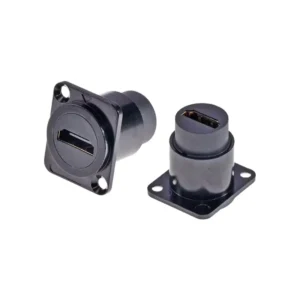
What is HDMI bulkhead connector?
The HDMI bulkhead connector – sometimes called a chassis-mount connector – consists of one or both sides of the HDMI female port, which is directly fixed to the panel cutout through the threaded nut or snap-in flange. This is the most direct HDMI panel mount type, especially suitable for installation scenarios where the cable terminates at a fixed endpoint.
Applicable occasions: equipment rack, AV control room, industrial enclosure.
Main advantages:
- It is compact in size and occupies less space (compact footprint)
- Provide HDMI Type A (standard) and Type D (Micro) specification options
- Supports HDMI 2.0 and 2.1 to meet 4K / 8K transmission requirements
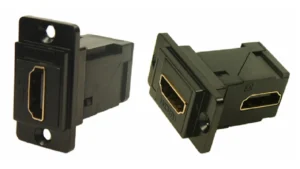
What is HDMI feedthrough adapter?
HDMI feedthrough adapter – also known as “female-to-female coupler” – is a passive embedded connector that can transmit HDMI signals through the panel without amplification. Each side accepts a standard HDMI plug, allowing two separate lines to achieve end-to-end connection on the panel surface.
Applicable occasions: conference room, education and training center, briefing wall
Main advantages:
- No power supply – fully passive
- Attenuation is very low at short cable run (less than 5 meters per segment)
- Cost-effective for bulk purchases
Note
Because the HDMI feedthrough adapter is a passive component, it will bring some insertion loss. If either side of the line exceeds 5 meters, it is recommended to switch to an active extender or fiber optic HDMI solution.
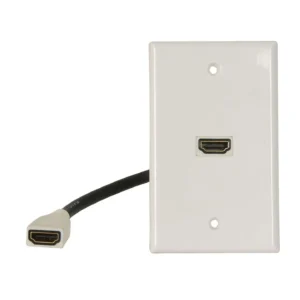
What is HDMI wall plate connector?
The HDMI wall plate connector is a decorative embedded panel – usually conforming to the standard single-gang or double-gang wall box specifications – that can integrate one or more HDMI ports and share the same panel with other AV or data connection interfaces. This is the preferred solution for the completion space that focuses on indoor aesthetics.
Applicable occasions: boardroom, hotel rooms, classrooms, retail space
Main advantages:
- The appearance is clean and professional, compatible with standard electrical junction box
- Common in the same faceplate (panel) integrated HDMI, USB, VGA, 3.5mm sound source or Ethernet
- Available in a variety of color options (white, black, ivory, brushed aluminum)
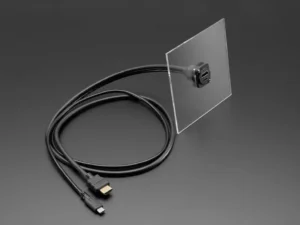
What is panel mount HDMI extension cable?
Panel mount HDMI extension cable is a short elastic pigtail wire with a length of 15-30 cm. One end is a HDMI female head panel mount with a bracket, and the other end is a standard HDMI male plug. The bracket is locked into a standard panel cutout, and the pigtail is internally connected to the source or destination device.
Applicable occasions: tight enclosure with limited space, customized production, OEM integration
Main advantages:
- More flexible internal routing
- It is suitable for the scene where the bulkhead connector cannot be installed directly in place
- Provides a right-angle configuration to reduce the bend stress
What is rackmount HDMI panel?
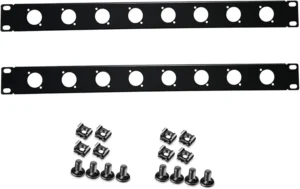
The Rackmount HDMI panel is a 1U or 2U rack mount patch panel with multiple HDMI panel mount connectors – typically 4, 8 or 16 ports – designed for centralized signal distribution in rack devices and is a professional first choice for large AV systems.
Applicable occasions: data center, broadcast studio, large AV system, NOC (network operation center)
Main advantages:
- Centralize all HDMI connections into a single rack location for unified management
- Supports structured cabling and is easy to troubleshoot
- Compatible standard 19-inch EIA rack
Key Specifications Assessment Points when Buying HDMI Panel Mount
HDMI version and Bandwidth
Because not all HDMI panel mounts support the same data rate, confirm compatibility with your target HDMI standard before buying:
| HDMI Version | Max Bandwidth | Max Resolution | Common Use Case |
|---|---|---|---|
| HDMI 1.4 | 10.2 Gbps | 1080p / 4K@30Hz | Legacy AV systems |
| HDMI 2.0 | 18 Gbps | 4K@60Hz (HDR) | Conference rooms, signage |
| HDMI 2.1 | 48 Gbps | 8K@60Hz / 4K@120Hz | Broadcast, gaming, simulation |
Cable length and Signal Integrity
Because the HDMI spec defines minimum performance rather than a maximum cable length, real-world limits depend on cable type: passive runs hold 10–15 m, active cables reach 30 m+, and HDBaseT or fiber extenders reach 100 m over structured cabling. If your run is long, refer to the HDBaseT Alliance specifications for a compliant extender.
Panel Cutout Size and Form Factor
The panel cutout size of the standard HDMI Type A is about 14mm × 7mm, but be sure to confirm the actual size to the shell manufacturer. Key institutional considerations include:
- Fixation: D-sub threaded nut, snap-in clip or screw flange (snap-in clip or screw flange)
- Panel completion method: flush vs.recessed (recessed can prevent accidental pull-out)
- IP rating — Because outdoor and industrial environments expose the port to dust and moisture, select an IP54 or higher HDMI panel mount for those settings
HDMI Panel Mount Connector Installation Steps
Install the HDMI panel mount according to the following systematic process to ensure construction quality and subsequent maintenance convenience:
Step 1: Plan the route direction
Before cutting the panel, determine the internal and external cable path.
Step 2: Cutting panel openings
Accurately open the hole using a stepped drill bit or nibbling tool, and confirm the exact dimensions with reference to the connector datasheet.
Step 3: Fixed joint
Insert HDMI panel mount connector from the front, lock nut from the back, and lock according to the manufacturer ‘s torque.
Step 4: Connect internal cables
Connect the female port or pigtail on the back to the internal HDMI source or destination wire, and use the cable tie to sort out the wire allowance to avoid pulling.
Step 5: Test signal connectivity
Because HDMI negotiates an EDID and HDCP handshake before passing video, test with the actual display and source — a panel mount that passes a continuity test can still fail the HDCP handshake if a contact is marginal. Confirm the image outputs correctly before closing the shell.
Step 6: Label the connection label
The multi-port panel needs to be labeled at both ends of the HDMI panel mount connector. It is recommended to use P-touch or thermal induction labeling machine.
HDMI Panel Mount vs Standard HDMI Cable
| Feature | Standard HDMI Cable | HDMI Panel Mount |
|---|---|---|
| Mounting | Loose / floating | Fixed to panel surface |
| Strain relief | Minimal | Built-in to housing |
| Connector wear | High (frequent plug cycles) | Low (cable stays connected) |
| Aesthetics | Exposed cable | Clean, flush finish |
| Signal quality | Unchanged | Unchanged (passive types) |
| Installation cost | Low | Moderate |
| Best for | Temporary connections | Permanent installations |
The main application scenarios of HDMI Panel Mount solution
HDMI panel mount connector is widely deployed in various professional environments:
Corporate AV: HDMI wall plate connector is used in the board room and the huddle room to provide a clean and easy-to-use connection point for laptops and briefing equipment.
Broadcast & Media Production: Rackmount HDMI panel allows the control room to quickly switch signal sources and maintain structured signal routing.
Education: The classroom uses HDMI feedthrough adapters at floor boxes and ceiling drops to serve teacher workstations to serve the needs of the teacher workstation.
Hospitality: The hotel installs HDMI wall plate in the guest room desk and indoor entertainment panel, and is often used with USB-C and Ethernet.
Industrial & Defense: Enhanced HDMI bulkhead connector with IP protection level shell, which can protect the connection point in harsh environment.
Retail & Digital Signage: The Panel mount HDMI extension allows media players to be centrally installed with a clean finish in front of the display.
Purchasing guide: 7 questions that must be answered before placing an order
Before specifying the HDMI panel mount specification for your project, please clarify the following questions:
- Which HDMI version should be supported? (to be matched with the source and display specifications)
- How long are the internal and external cable runs?
- What is the material and thickness of the panel? (Affect the selection of fixed hardware)
- Installation environment is indoor, outdoor or industrial place? (Decide the required IP rating)
- How many ports are required for each location? (single port vs. rackmount panel)
- Do you need to transmit HDCP copyright protection content? (Ensure complete HDMI compliance)
- How high is the expected insertion frequency? (Gold-plated contact and strong shell are recommended for high-frequency insertion and extraction scenarios)
Frequently Asked Questions
Will HDMI panel mount reduce the signal quality?
No. The passive HDMI panel mount connector (bulkhead, feedthrough, wall plate) does not electronically process the signal and only brings negligible insertion loss. As long as the overall cable run length is within the HDMI passive transmission limit (about 10 ~ 15 meters), the signal quality is not affected.
What is the difference between HDMI bulkhead connector and HDMI feedthrough adapter?
Both allow the HDMI signal to pass through the panel, but the bulkhead connector is designed to be rigidly fixed to the panel cutout with locking nut, while the feedthrough adapter is a simpler inline coupler and does not necessarily contain fixed hardware. For permanent installation, the dedicated HDMI bulkhead connector provides superior mechanical stability.
Can HDMI panel mount be used for HDMI 2.1 (48 Gbps) signal?
Yes, but the rated specification of the joint must be confirmed to support HDMI 2.1. Many low-cost panel mount connectors are only HDMI 1.4 or 2.0 certified. Before specifying specifications in high frame rates or 8K projects, be sure to check the manufacturer’s datasheet to confirm the bandwidth rating.
What is the standard panel cutout size of HDMI Type A?
The standard panel cutout of HDMI Type A bulkhead connector is about 14 mm wide × 7 mm high, but the size of each manufacturer is slightly different. Please be sure to confirm with the datasheet of the specific product.
Does an HDMI panel mount support HDCP and ARC/eARC?
Passive HDMI panel mounts (bulkhead, feedthrough, wall plate) pass all 19 HDMI pins, so HDCP, ARC, eARC, CEC, and Ethernet channel pass through transparently. Because the connector doesn’t process the signal, whatever the cable and source/display support, the panel mount carries — as long as it’s rated for the bandwidth.
What HDMI version do I need for 4K 120Hz or 8K?
You need HDMI 2.1 (48 Gbps) for 8K@60Hz or 4K@120Hz; HDMI 2.0 (18 Gbps) tops out at 4K@60Hz. Because many low-cost panel mounts are only HDMI 1.4 or 2.0 certified, always check the datasheet bandwidth rating before specifying for high-frame-rate or 8K projects.
Is HDMI panel mount the same as a USB or network panel mount?
No — each carries a different signal: HDMI for video/audio, USB for data/power, LC for fiber, RJ45 for copper Ethernet. Because they use different connectors and pinouts, they aren’t interchangeable. For other interfaces, see our USB panel mount, LC panel mount, and RJ45 waterproof connector guides.
Summary
Whether you’re fitting out a boardroom wall plate, a broadcast rack, or an IP-rated industrial enclosure, the right HDMI panel mount comes down to four things: HDMI version/bandwidth, cable run length, panel material and thickness, and IP rating. Because passive panel mounts (bulkhead, feedthrough, wall plate) don’t process the signal, they preserve image quality within the cable-length limit — while rackmount panels centralize large AV systems for clean management.
For professional AV and industrial integration, Verchil manufactures HDMI panel mount connectors and custom assemblies — bulkhead, feedthrough, wall plate, extension, and rackmount types, in HDMI 2.0/2.1 and IP-rated variants built to your panel spec. Explore Verchil’s HDMI panel mount range and full network connector lineup, or see related guides: USB panel mount types, LC panel mount, and RJ45 waterproof connector. For custom HDMI assemblies, contact Verchil’s engineering team.